
Student Onboarding Automation: How Voice Bot Converts Enrollments Into Active Students
Enrollment alone doesn’t guarantee success—student activation does.
Traditional onboarding overwhelms students with emails, confusion, and delays, causing massive drop-offs.
Student onboarding automation with Voice bot transforms enrollments into fully active students through real-time, guided conversations.
Why Enrollment Is Not Success—Activation Is
The Truth About Student Enrollment
Most colleges have a reason to celebrate when students enroll. However, enrollment is only the first part of the process. Here is the issue: between one-third and almost half of the students who enrolled never fully activate. These students paid the enrollment fee but never created their accounts, never logged into the system, never registered for classes, never showed up for orientation, or never showed up on the first day
Why Student Onboarding Matters
Once students are enrolled, colleges flood them with various emails that include extensive PDF files, various login processes to go through, and various forms to fill out. The end result is what one would expect: students feel lost and confused.
Many of them just give up before they even begin. This is a huge financial issue, as colleges spend thousands of dollars to recruit each student. A large number of them never activating results in millions of dollars of recruitment investment being wasted.
Why Student Onboarding Automation Is the Answer
Information Overload in Student Onboarding
Hours after signing up, students are bombarded with a barrage of emails: welcome messages, step-by-step instructions for account setup, links to extensive student guides, housing deadlines, financial aid follow-up, course enrollment tutorials, and orientation sessions.
What students do is open the first message, get overwhelmed by the number of emails, shut them all down, and vow to attend to them later. Later never arrives. This is how the email dump strategy presumes students can, on their own, break down and accomplish difficult tasks.
Students Don't Know Where to Start
The emails do not instruct the student on what to do first, second, or third. Everything comes at once and seems as urgent and confusing as everything else. The student is left wondering if they are supposed to set up their account before they can register for classes, if they are supposed to do the orientation before or after they pay, and what will happen if they get it all wrong. They make an educated guess, often wrong, and stall
No Quick Help for Student Onboarding Questions
But when the students inevitably get confused—and they always do—their options are very limited. They can email and wait a day or two for an answer, call during business hours and wait on hold for a long time, or search through dozens of pages of PDF files hoping to find their answer.
But most students have a fourth option: they just give up. This is a big problem for students in other time zones, students who work and can’t call during business hours, and international students who have trouble with English.
Nobody Monitors Student Onboarding Progress
The traditional student orientation process is completely passive. The college will send information to the student, hoping they will respond, but there is no way to check if the student is stuck, no way to proactively check in with the student to see if they need assistance, and no way to track which students have completed which steps. Students will fall through the cracks in silence, and no one will notice until it is too late—usually not until the student doesn’t show up on the first day of class.
Why Student Onboarding Automation Fixes These Problems
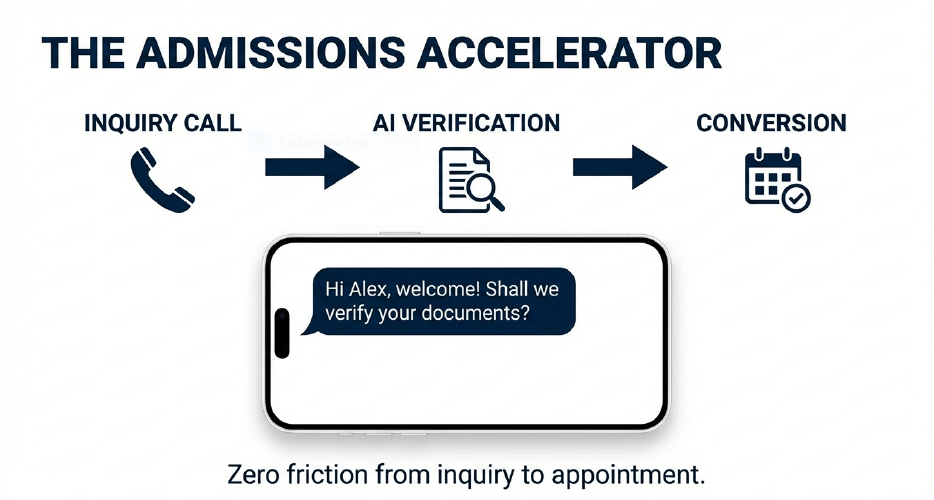
Automation of student onboarding replaces the passive email method with active conversations. Voice bot dials students directly within minutes of enrollment and leads them through each step in a logical order.
Answers to questions are provided instantly, and students who are struggling are assisted proactively. This turns the confusing maze of onboarding into a guided process that almost every student completes successfully.
What Is Student Onboarding Automation
Understanding Student Onboarding Automation
Automation of student onboarding involves the use of Voice bot technology to walk newly enrolled students through the entire setup process, from opening an account to downloading campus apps to enrolling in classes to setting up an orientation schedule.
Rather than the traditional method of sending students a series of emails and hoping they can somehow manage on their own, Voice Bot technology actively contacts each student within minutes of enrollment and has a personalized conversation with them to walk them through the entire student onboarding process.
How Student Onboarding Automation Is Different
The old way of doing things is to send many emails over a period of weeks and hope that the students read them, understand them, and take the necessary steps in the right order. The new way of doing things, through automation, is that Voice bot will call the student within minutes of enrollment and walk them through everything in one productive conversation.
This paradigm shift from passive information delivery to active guidance is what makes all the difference in whether students activate or fall through the cracks before their college experience even begins
What Voice Bot Does During Student Onboarding
Voice bot is involved in several key activities during the onboarding conversation. It confirms enrollment information with the student, walks them through the process of setting up their account while they are on the phone, assists them with downloading necessary campus apps, walks them through course registration, automatically schedules orientation sessions, gathers key student preferences and logistics, responds to questions in real-time as they come up, and sends text or email confirmations of what has been accomplished. This is accomplished in a single conversation that takes mere minutes, not weeks of email exchanges.
Key Features of Student Onboarding Automation
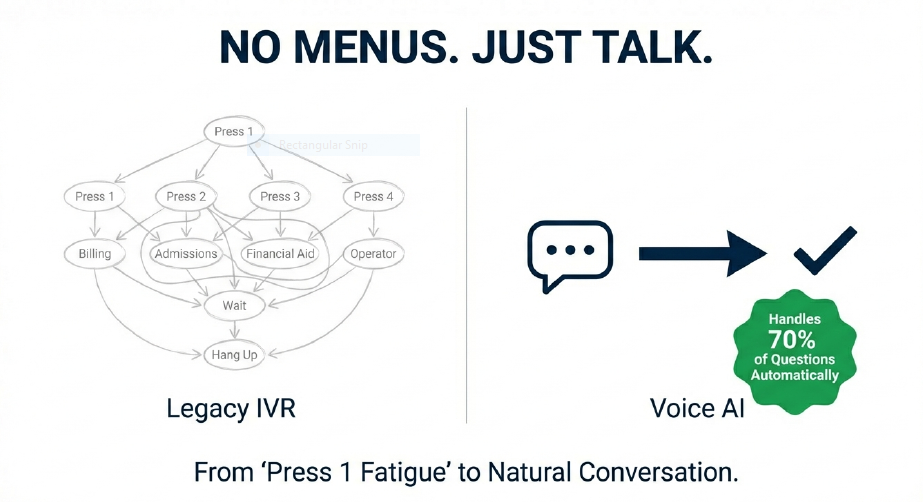
The automation also has several strong capabilities that make it successful. Proactive outreach means Voice bot does not wait for students to call but calls them within minutes of enrollment when the level of engagement is highest. Natural conversation enables students to just talk normally without having to press buttons or navigate menus.
Real-time action means that while on the call, AI actually performs actions such as setting up accounts, sending links, and setting up appointments instead of just telling students what to do. Automatic updates ensure that all activities are recorded in college systems without the need for manual entry.
Multilingual support enables onboarding in over a hundred languages for international students. Smart transfers mean that if students require specialized assistance, AI will transfer them to humans with all the context so that students do not have to repeat themselves.
Why This Is Called "Automation"
The whole process occurs without the need for human staff intervention for normal cases. When a student joins, the whole process automatically starts by triggering Voice bot AI to call the student in minutes. AI assists the student in all the necessary steps, records everything in college systems automatically, follows up if anything is left incomplete, and resorts to human staff only for cases that are truly complex. This can be done for ten students or a thousand students with the same efficiency and speed.
How Voice Bot Student Onboarding Works
Student Onboarding Automation in Action
Let me walk you through exactly what happens during automated student onboarding.
As soon as the student submits the enrollment fee, the enrollment system automatically triggers a notification to the Voice bot platform that a new student requires enrollment. Within minutes, the Voice bot platform is ready to reach out to the student via the phone number submitted during enrollment.
The Welcome Call
Not long after the student has enrolled, the student’s phone call comes through with the university name on the caller ID. Voice bot welcomes the student by name, thanks them for enrolling, and asks if they have a few minutes to get started for the first semester. Most students are eager and willing since they have just finished enrolling.
Account Setup Guidance
Voice bot leads the student through the process of creating their student account. It gives them their student ID number, tells them which web portal to go to, leads them through each entry they must make, assists them in creating a password that satisfies the criteria, and verifies that they have successfully logged in.
This process is done together with the student over the phone, so if the student becomes confused or stuck at any point, Voice bot can correct it immediately.
Campus App Installation
After the account has been created, Voice bot walks the student through the process of downloading and installing the campus mobile app. The AI instructs the student on exactly what to search for in their app store, verifies that they have located the correct app, and assists them in logging into the app using their newly created account.
Voice bot AI describes how the student will utilize the app to check their schedule, view assignments, and stay current with campus news.
Course Registration Assistance
Voice bot assists with course enrollment by analyzing what courses the student is required to take in their first semester according to their major, displaying options for their schedule that meet these needs, asking the student about their preferences for class times, and finally booking the courses chosen by the student. This makes what can be a confusing and overwhelming process very easy and straightforward.
Orientation Scheduling
Voice bot provides the dates and times of available orientation sessions, and the student chooses what is best for them, and the AI automatically schedules the session. This prevents the usual issue of students wanting to schedule an orientation session but never actually getting around to doing so.
Information Collection
As a part of the conversation, Voice bot automatically asks a few quick questions related to the student’s preferences regarding housing, whether the student will be working part-time, transportation, and any other logistics that will enable the institution to better serve the student. All of this is automatically recorded in the correct systems.
Summary and Next Steps
Before hanging up, Voice bot summarizes all that was accomplished, verifies the student received confirmation communications, and reminds them they can call anytime with questions. The student hangs up feeling ready, feeling supported, and knowing what has been accomplished and what will happen next.
Behind-the-Scenes Automation
As the student goes about their day feeling accomplished, Voice bot also updates the CRM to reflect the status of completion of the onboarding process, records all information within the student information system, sends follow-up communications, notifies departments of incoming student needs, and notifies advisors that the student is ready for academic planning. This is done without any member of staff having to manually record information or track the process.
Real Student Onboarding Success Stories
State University Transforms Student Onboarding
Prior to the implementation of the automation of student onboarding, State University had been sending several emails to new students, but only a third of them were able to complete the onboarding process. The staff members spent a lot of time each week trying to follow up on students who had not completed the onboarding process, and every year, hundreds of students failed to show up despite enrolling.
However, after the implementation of Voice bot, which calls every student within minutes of enrolling, the completion rate of the onboarding process rose to nearly ninety percent.
The amount of time spent by staff members on the onboarding process significantly reduced since the AI automatically followed up on routine cases. The number of students who failed to show up after enrolling also reduced, resulting in the saving of tuition revenue. Student satisfaction scores also significantly improved since students felt valued and supported by the institution immediately.
International Student Onboarding Success
A community college was having trouble activating international students, with most of them never showing up after being enrolled. Barriers of language and visa documentation requirements led to fear and paralysis, causing students to be unable to proceed.
They introduced Voice bot, which calls international students in their own language within an hour of enrollment, explains visa documentation requirements in languages such as Mandarin, Spanish, Hindi, or Arabic, allows students to directly contact the international student office, and transmits all documents in the students’ language of choice.
International student activation rates were nearly doubled, the no-show rate was significantly reduced, and international enrollment significantly increased year over year as the word got out about the welcoming process the college offered.
Evening and Weekend Student Onboarding
Metro University found that more than half of their adult students enrolled in the evenings and weekends when the admissions office was closed. These students had questions but no one to answer them, resulting in low activation rates among this important group.
They implemented Voice bot, which works 24/7, so evening enrollments get immediate callbacks, and adult students with jobs get the support they need when they are actually available to interact. Evening and weekend activation rates skyrocketed, adult enrollments increased significantly because students felt supported, and admissions personnel no longer had to work on Saturdays to stay on top of onboarding.
Benefits of Student Onboarding Automation
Benefits for Students with Onboarding Automation
Students get immediate assistance in minutes after enrollment, unlike waiting for office hours. They never feel lost or puzzled because Voice bot leads them through each step with careful instruction. Foreign students receive orientation assistance in more than a hundred languages, including Spanish, Chinese, Hindi, Arabic, and many more.
Students relate their story only once, and AI retains all the information, so there is no problem of repeating the same information to different people. Assistance is provided twenty-four hours a day, including midnight, weekends, and holidays, whenever students actually enroll and want to begin.
Benefits for Colleges with Student Onboarding Automation
Institutions notice that activation rates go up significantly, often more than doubling from before. This means that many more students who are enrolled actually end up attending and becoming active participants. Staff time spent on activation decreases dramatically because the system is handling the vast majority of students, leaving staff to handle only the complex ones.
Revenue growth is substantial because every additional activated student means years of tuition revenue. The institution makes a great first impression that students communicate to their friends and family, improving reputation and reputation-driven admissions.
The system can handle any number of students with the same level of quality and speed, which means that enrollment growth does not have to be accompanied by staff growth. Summer melt, the issue of students who enroll but do not show up, is reduced because students remain engaged during the summer.
Benefits for Admissions Teams
Employees no longer spend most of their time answering the same fundamental questions over and over again. Rather, they are able to engage in more fulfilling activities such as relationship-building, offering guidance on complicated scenarios, formulating strategic enrollment plans, and advising students with special needs.
Work-life balance is significantly enhanced since employees no longer have to work in the evenings and weekends to stay on top of onboarding activities. Employee satisfaction is also significantly higher since employees feel satisfied knowing that they are working on important activities and not mere administrative ones. Meeting enrollment goals becomes less of a challenge since activation rates are significantly enhanced.
Student Onboarding Software Technology
What Student Onboarding Automation Software Connects To
The automation of student onboarding processes links with your current student information system to read the enrollment information and write the completion information. It also links with your customer relationship management system to record all conversations.
The automation of student onboarding processes links with your learning management system to confirm the creation of an account and verify the status of course registration. The system also links with communication systems for making calls, sending emails, and sending text messages. The calendar system integration allows for the automatic scheduling of orientation meetings and advising sessions.
How Student Onboarding Software Integration Works
Application programming interfaces—imagine these as electrical plugs—are what enable Voice bot to talk to your current systems. This means that when the AI finishes a task such as registering a student for orientation, this data is instantly reflected in all the appropriate college systems.
The key point is that you’re not replacing your current systems with Voice bot; rather, Voice bot AI exists on top of your current infrastructure and plugs all of your systems together.
Security of Student Onboarding Automation
The Education-focused Voice bot solutions are designed to adhere to very strict regulatory standards. They are FERPA compliant to ensure privacy for students as per US regulations. They are SOC 2 Type II compliant, which is the highest level of data security, and are subject to regular audits by third-party auditors.
All calls and data transfers are encrypted so that no one can intercept or listen to the calls without permission. Access controls are role-based to ensure that the AI accesses data only if it is necessary for the task, just like human employees.
Student Onboarding Automation Implementation Time
The pace of implementation is much quicker than a typical IT project. The first week is about understanding your current onboarding process and finding the points of integration with your current systems. The second week includes setup, where the vendor integrates Voice bot with your systems and develops conversation flows based on your processes.
The third week is all about testing, where your team makes test calls and gives feedback to improve. The fourth week is a small launch with a small number of students while closely watching the outcomes.
By the fifth and sixth weeks, you are up and running to serve all new enrollments. The whole process, from start to full implementation, takes one to two months, as opposed to a year or more for a typical project.
Student Onboarding Automation Software Cost
Implementation: This involves a one-time setup cost to set up the system and interface it with your platforms. The annual licensing costs depend on the number of enrollments and the functionality needed.
The first year cost will involve both the setup cost and the annual licensing fee, while the rest of the years will only involve the licensing fee. Most of the institutions will find that the investment will pay for itself in the first year, considering the savings in staff costs and the additional revenue from higher activation rates. The return on investment will be well over several hundred percent.
Getting Started with Onboarding Automation
Assess Your Current Student Onboarding
Start by understanding your current state. Determine the number of enrolled students who actually attend the first day of classes over the past few years to determine your activation rate. Determine the number of days or weeks that pass between enrollment and activation.
Determine the number of staff hours spent on post-enrollment activities each week. Determine the specific steps in the process that have the lowest completion rates and the most frequently asked questions. This will give you a clear understanding of the problem you are trying to solve and will give you metrics to measure success.
Calculate Potential Return on Investment
Understand the financial implications of your current onboarding problem. Calculate the lost revenue by multiplying the number of students enrolled who have not activated by the tuition revenue they would have generated. Calculate the cost of staff time by determining the number of hours spent on onboarding activities per week and multiplying that by the cost of staff salaries.
Add these two numbers together to get the annual problem cost. Most institutions will find that the automation of student onboarding, which will cost a fraction of the problem cost, will provide a solution to most of these problems, offering a tremendous return on investment.
Start with a Pilot Program
Instead of implementing on a full scale right away, begin with a pilot test to demonstrate effectiveness. This can be done with a few hundred students over a number of weeks to two months.
The criteria for success can include, but are not limited to, a substantial improvement in activation rate, a substantial reduction in staff time requirements, and high student satisfaction scores. Once these goals have been met, full implementation can take place with confidence.
Choose the Right Student Onboarding Software Provider
Choose a provider that has experience working with colleges like yours. Make sure they have the ability to integrate with your student information system, CRM, and learning management system. Choose providers that have the ability to assist with implementation and optimization.
Ask for case studies and references from other customers. Make sure they have the ability to meet all of the security and compliance needs that are required for handling student data. Ask questions about their experience in higher education, integration, implementation time, pilot program availability, support, and references before making a decision.
Prepare Your Team for Student Onboarding Automation
Address staff concerns ahead of time and be upfront with them. Let them know that automation is used for repetitive work so staff can concentrate on more meaningful tasks that require human intelligence, not that automation replaces staff. Tell them that for simple setup questions, students would rather have immediate automated answers than wait for human feedback, but for complex problems, those still go to the human staff.
Demonstrate how Voice bot works with what is already in place, rather than replacing it. Get your staff to help design conversation paths, test the system, and give feedback during the implementation phase and review initial results. When staff feel a sense of ownership and understand how automation benefits them, implementation becomes seamless.
Launch Your Student Onboarding Automation
The first month after launch involves monitoring daily completion rates to verify that the system is working as intended. Listen to recordings of conversations to find areas where the AI response could be improved. Look for patterns in the types of questions asked by students and where confusion exists in the steps.
Modify scripts and conversation logic based on what has been discovered. Regular practices include reviewing the system’s performance each month, adjusting for seasonal peaks in enrollment, implementing new functionality at a controlled rate, and refining the system based on feedback from students and staff. The system will improve with time as it learns from interactions.
Frequently Asked Questions (Faqs)
Q1: What is student onboarding automation?
Automation of student onboarding involves the use of Voice bot to walk newly enrolled students through the entire process of setting up their accounts to enrolling in classes and scheduling orientation.
Rather than sending students a series of emails and hoping they somehow manage on their own, Voice bot calls each student within minutes of enrollment and has a personalized conversation with them to walk them through the entire process.
The AI responds to questions in real-time, finishes tasks during the phone call, and automatically updates all college systems. This ensures that all students are successfully onboarded without using staff resources and usually boosts activation rates significantly.
Q2: How is student onboarding automation different from sending emails?
Emails are passive communication—you send information and hope students read it, understand it, and do it correctly. Most students don’t read emails thoroughly, and when they have issues, they don’t have a direct source of help.
Student onboarding automation is active communication—Voice bot talks directly to students, has a two-way conversation, adjusts explanations based on each student’s situation, and resolves issues immediately when they occur. If a student is unsure about any part of the process, Voice bot can clarify it in a different way, walk them through the portal over the phone, and finish tasks together.
It’s a completely different thing from giving someone written directions versus showing them personally. And Voice bot is always on, speaks in over a hundred languages, and gathers important information from conversations that emails can’t.
Q3: Will students be upset about talking to AI instead of a person?
Most students are only concerned with getting assistance as quickly as possible and do not particularly care if the assistance is from AI or a human. In fact, many students find Voice bot to be a better option for simple onboarding tasks because it provides immediate assistance with zero wait time, is available at any time of day or night, and enables students to ask simple questions without the embarrassment of being asked something they should know. Waiting days for email assistance or hours on hold with human staff is no contest to immediate AI assistance for simple procedural tasks such as account setup or class registration. Voice bot is upfront about being a virtual assistant and recognizes when a human is needed to make decisions, at which point it transfers the student to human staff with complete context so that students never have to repeat themselves. Students have been highly satisfied with Voice AI onboarding assistance because it immediately solves their problems, and they can get human assistance anytime if they want.
Q4: What happens to admissions staff with student onboarding automation?
The admissions staff are not laid off; instead, their jobs are much improved. They currently spend most of their time on mundane onboarding tasks such as answering the same fundamental questions dozens of times a day, tracking down students who have not finished necessary steps, and updating multiple systems with the same information. With Voice bot taking care of mundane onboarding tasks, the staff can focus on high-value tasks that require human intelligence: relationship-building with prospective students, personalized advice for complex scenarios, strategic enrollment plan development, guidance for students with special needs, and overall process improvement at the institution. The staff are much happier with their jobs because they get to spend time on high-value tasks that require human judgment and empathy. The institution does not lay off staff but ends up managing many more students because Voice bot handles the volume, and humans handle the complexity.
Q5: How long does student onboarding automation take to implement?
In contrast to more traditional IT projects that take a year or more to complete, student enrollment automation will typically be up and running in one to two months. The first week is understanding your current process and identifying what systems you need to integrate. The second week is the technical implementation, where the provider sets up Voice AI connections to your current systems and develops conversation flows based on your unique processes and policies. Week three is the testing phase, where your team makes test calls and gives feedback to improve. Week four is a controlled launch with a small group of students while analyzing outcomes and adjusting. By weeks five and six, you are serving all new students. The provider takes care of all technical implementation tasks, so your IT department doesn’t have to develop infrastructure or code. Most colleges find that the implementation process is easier and faster than expected, since the provider is handling all the complex technical pieces, and your team is just providing information about your processes and answering questions about institutional policies.
Final Thought: Student Onboarding Determines Everything
Colleges spend huge amounts of resources on recruiting students through marketing, campus visits, application processing, and enrollment campaigns. However, enrollment is not the end result but merely the start. Activation is where the real value lies. A student who enrolls but never activates means a total loss of investment in recruitment as well as damage to the reputation of the institution.
Student onboarding automation turns the critical phase of enrollment and first day of classes from a chaotic and confusing experience where students tend to fall through the cracks into a supportive experience where almost every student activates.
The colleges that will survive and thrive will be those that not only concentrate on their enrollment numbers but also work on the entire student experience from the first inquiry to graduation. Student onboarding automation is the building block that ensures enrolled students actually arrive and succeed.