
Auto Analyze Lost Deals – Find Hidden Patterns & Win More
Archiz auto analyze lost deals tool quietly scans every closed-lost opportunity in your CRM, finds repeating patterns, uncovers root causes, and shows exactly what’s stopping sales from closing.
See it in action
Auto-analyze lost
Stop Guessing Why You’re Losing – Let AI Show You
Most teams look at lost deals once a quarter, if at all. This tool runs automatically after every lost opportunity, collects data from CRM notes, call logs, emails and stage history, then highlights common failure points: wrong pricing, missing features, competitor strength, bad timing, poor discovery. You see trends across the whole team — not just one rep’s opinion.
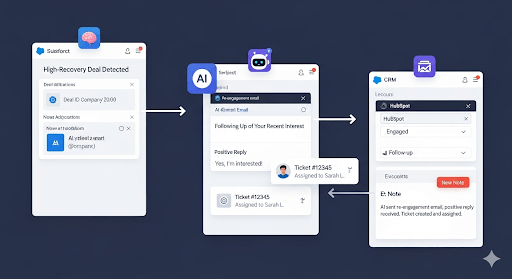
Key Features
Data Aggregation
The agent automatically pulls data from your CRM on all deals marked as “Closed-Lost,” including all notes, call transcripts, and emails associated with them.
Thematic Pattern Recognition
The AI analyzes all of this unstructured text data to identify and tag the most common reasons for losing (e.g., “Price,” “Missing Feature,” “Went with Competitor X”).
Insights Dashboard
The agent provides a clear dashboard showing you which competitors you lose to most often and which objections are most frequently derailing your deals.
Use Cases
Auto-Analyze
Software Company
Discovered from the data that they were losing 30% of deals due to a specific missing feature. They used this data to justify prioritizing the feature on their product roadmap.
Mid-Market Sales Team
Realized their main competitor was winning on price 60% of the time. They created a new “competitor battlecard” and trained the team on value selling, cutting their losses to that competitor in half.
Tech Startup
Found that deals were most often lost right after the initial demo, leading them to completely revamp their demo process and improve their follow-up strategy.
More Agent Template
Daily AI-generated Action List
Creates daily task lists based on CRM activity, pending actions, and goals.
Extract leads from website forms
Pulls data from web forms and routes qualified leads to sales teams.
Auto-assign leads based on rules
Assigns leads using territory, source, or priority logic to the right rep.
Voice note → Lead creation
Transcribes voice notes and creates structured lead entries with tags and reminders.
Auto-log calls & emails
Automatically logs calls and emails into CRM, linking them to the correct lead or deal.
Weekly sales summary email
Sends weekly summaries of sales activity, outcomes, and pipeline movement.
Predict deal win probability
Uses AI to predict likelihood of deal closure based on lead behavior and history.
Lead scoring using AI
Ranks leads based on profile match, activity, and conversion potential.
Sentiment analysis on calls
Analyzes call transcripts to assess sentiment, urgency, and objections.
Smart rescheduling for missed calls
Detects missed calls and rebooks meetings based on availability.
Auto-create tasks from WhatsApp
Converts WhatsApp chats into actionable CRM tasks with context.
Value Proposition
Stop making the same mistakes and start winning more.
Get objective, data-driven insights into why you’re losing.
Make strategic decisions about your product, pricing, and sales training.
Turn your losses into your greatest learning tool.
FAQ
It automatically reads every lost opportunity in your CRM, finds repeating reasons and patterns, and creates simple reports so you know exactly why deals are slipping away — without spending hours reviewing manually.
Most teams start noticing better win rates and stronger objections handling within 2–4 weeks — because they fix the most common loss patterns quickly instead of guessing.
Absolutely. Define custom taxonomies, map existing picklists, and tune thresholds so categories reflect the organization’s language and segments.
As far as the CRM provides. The system ingests the entire Closed–Lost history available through the CRM API or export, enabling multi-year trend analysis.
Run on demand or on a schedule (e.g., quarterly), with comparisons across periods to monitor shifts in competitor pressure, pricing objections, or product gaps.
Automate with AI
Start your free trial today.
Stop guessing why you lose. Start knowing. Turn your losses into your biggest strength. Activate your Deal Loss Analyzer today.
CRM Software has this features:
Every business does things a little bit differently, leading to very diverse needs. While there are some functions that are quite standard across the board, there are often functions that an out-of-the-box solution may not be able to handle.
Thousands of businesses do not use their CRM to its maximum effect, which can reduce productivity, customer satisfaction, and sales. It can be difficult for an organization to implement or manage a CRM tool, especially if they lack the required IT expertise, and what works well for another organization may not work so well for yours
Archiz CRM will Help you with Following features